How can I access the webspace database from outside?

Not at all: for performance reasons, the databases of your web hosting can only be reached from the web server itself. They are meant for software that runs directly on your web hosting.

You need an external database?

Then rent a vServer and set up MySQL or MariaDB on it yourself. With some packages you can also do this with one click using the app installer in the Cloud Manager. For a graphical interface, use phpMyAdmin.

If you need help with the setup, open a ticket. We are happy to help.

Where can I find the web space management?

Plesk logo
Plesk

Your web space management is Plesk. The quickest way in is through Vionity: log in at vionity.de, expand your web hosting in the left navigation and click “Plesk Webinterface”. You are redirected and logged in automatically.

Vionity login screen
Logging in to Vionity

Log in to Plesk directly

Plesk runs on one of our web hosting servers, for example host04.prepaid-webspace.de or host05.prepaid-webspace.de. Which one your web hosting is on is shown in Vionity with your web hosting. Log in there with the credentials you received by email.

Managing several web hosting packages

All your web hosting packages are in one shared Plesk account. That is why the credentials of your very first web hosting package always apply, for every further one too.

If the login does not work, see My Plesk access is not working, what to do?

How can I connect my domain to my webspace?

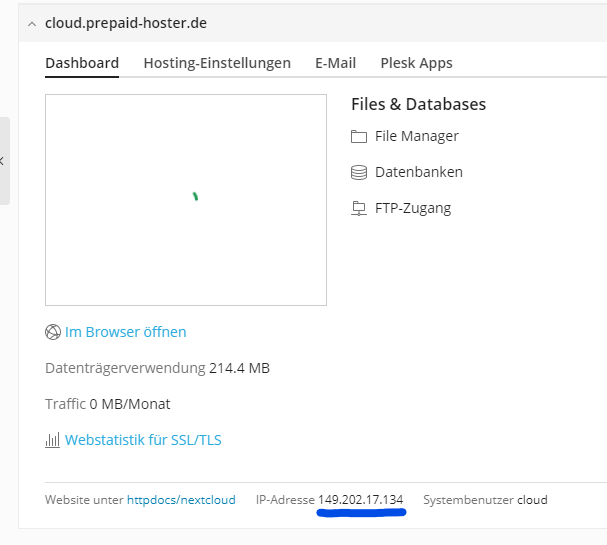
If you want to connect your domain to your webspace you have to enter the IP-address of your webhosting in the DNS-settings.

To find out the IP- address, we have to follow a few steps:

  • Login into Plesk.
  • Create the desired domain.
  • In the overview you can see the IP-address of your webhosting.
  • Have a look into the DNS-settings of your domain provider.
  • Create an A-Record without any name and paste the IP address in the content.
  • Create another A-Record with the name * (asterisk) and paste the IP address in the content.
IP-address of the subscription.

It could take up to 24 hours until your domain is connected to the webspace package. Usually you can add SSL-Certificates immediately.

Please notice that it is possible that you may receive different IP-addresses for new domains in Plesk.