What Payment Methods Have Fees?

Payment Method Fees
PayPal No fees
Credit Card No fees
Bank Transfer/Standing Order No fees
Paysafecard 13% fee
Fees for Account Top-Ups

Fees for Paysafecard

If you use Paysafecard to directly top up your account, a 13% fee will now be charged. The good news is that you can decide if this fee should be added to the transaction or deducted from your future balance. For example: if you want to add 50 Euro to your balance, you will either pay an additional fee of 6.50 Euro, bringing the total to 56.50 Euro, or you can opt to pay 50 Euro and receive a balance of 43.50 Euro.

In the past, we set all prices so that the fees charged by Paysafecard Wertkarten GmbH were covered by all customers. After 8 years, we decided not to pass these fees on to all customers in our service price calculations any longer. Only a small portion of our customers use Paysafecard for topping up. Thus, we believe this is a fair approach to continue offering fair pricing in the hosting industry.

If you prefer not to pay additional fees, you can use other payment methods like PayPal, instant bank transfer, credit card, or bank transfer to top up your balance.

Can I automatically top up my balance?

Yes, you can also automatically top up your balance at Prepaid-Hoster. You have the option to use PayPal or a traditional bank transfer.

With PayPal

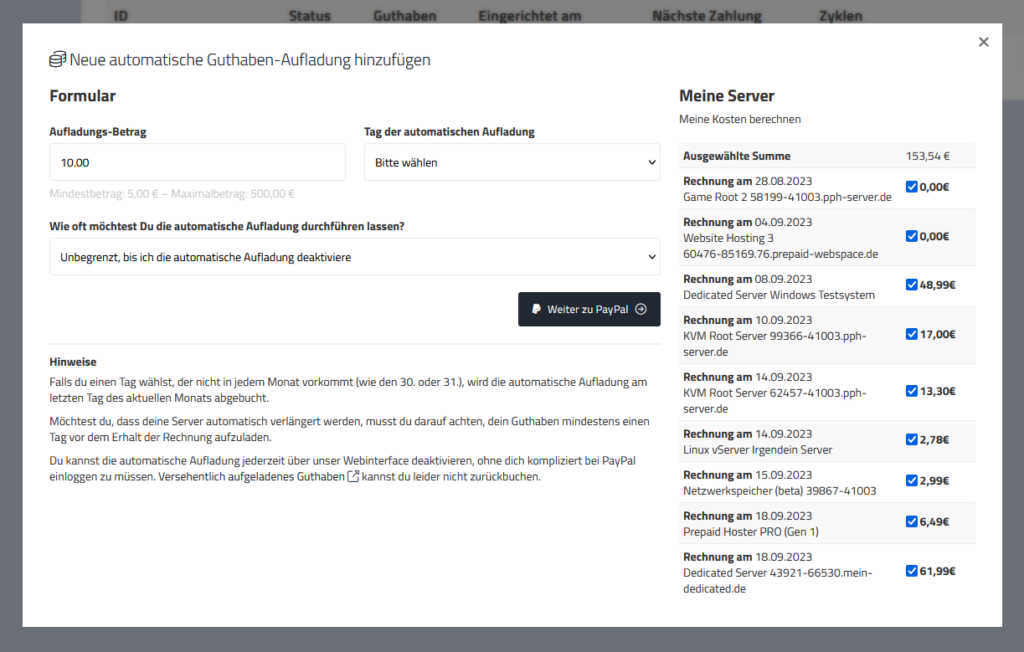
You can easily set up automatic balance top-ups through PayPal subscription in the web interface. Here’s how:

  • Sign in to the web interface
  • Open the “Customer Area” menu on the left
  • Click on “PayPal Subscriptions”
  • Click on “New Automatic Payment”
  • Customize the settings according to your preferences. You can activate multiple subscriptions.
  • Authorize the payment through PayPal

Your balance will now be automatically topped up through PayPal.

You can remove the subscription at any time directly in our web interface.

PayPal Subscription settings window

With Standing Order/Bank Transfer

In addition, we offer you the option to automatically top up your balance through your bank account. Simply set up a standing order and transfer the money to our account. You can find the necessary reference in the web interface under “Transactions” > “Set up Standing Order”.

A major advantage of this method is that you can also use the standing order as a regular payment. If you want to ensure that you always have enough balance in your account to use the service, you can set up the standing order to transfer the money automatically.

However, please note that the transfer must be executed 2-3 working days before the invoice date to ensure that the balance is on your account in time. This way, you can ensure that your service runs smoothly and that you don’t accidentally overlook a bill and get interrupted.

If you have any questions, please feel free to contact us at any time.

What additional costs can arise?

Name Costs
Server activation after abuse/anti-hack report one-time 5.00 Euro
Software installation (installation service) Mon-Fri: 15 Euro/15 minutes.
Weeekend/holidays: 30 Euro/15 minutes
Backup creation (optional) after abuse/anti-hack 15 Euro/15 minutes, excluding activation fee
Backup creation 15 Euro/15 minutes
Setup fees for dedicated servers 10.00 Euro, unless otherwise stated
Setup fees for additional IP addresses (dedicated servers, per IP address) 10.00 Euro/IP address
Traffic increase (vServers, KVM) 9.50 Euro per TB per month

How can I revoke my order and get a refund?

You can revoke an order within 14 days. In most cases, though, the immediate cancellation in the control panel is faster and needs no form. So check first whether it is enough for you.

Check first: immediate cancellation

  1. Open your server in Vionity and click “Return or let expire” at the top.
  2. Choose the cancellation type “Immediate cancellation”.
  3. Enter a reason and your rating and tick the confirmation box.
  4. Click “Confirm cancellation”.

On the right you see the remaining days, the return fee and how much credit you get back before you confirm. Immediate cancellation works within the first 30 minutes after ordering for all vServers and web hosting. After that, any time for KVM Root 3.5, legacy KVM 2.0/3.0 and web hosting. Smart Value, Smart Essential and dedicated servers otherwise run until the end of their term, and dedicated servers have no 30-minute window either.

Important: the credit you get back is special credit. Ending the contract early is a goodwill service on our part. Special credit is calculated to the day, minus a 0.50 € return fee. It is not paid out and can expire. You can use it for new orders.

With an immediate cancellation, the server, its data and backups are deleted practically at once and cannot be restored. All details are in this article.

Revocation

If the immediate cancellation does not help you, you can revoke the order within 14 days. Because we start providing the service right away at your request, you confirm during checkout that performance begins before the revocation period ends. If you revoke, you therefore pay a proportionate amount for the time up to your revocation. We refund the rest to the payment method you originally used.

The complete and valid cancellation policy describes how to declare your revocation.

Always include in your revocation

  • Order number or name of the service
  • Order date
  • Email address of your customer account
  • Full name
  • Address
  • Current date

Good to know

  • If your server is suspended for a breach of our terms, for example abuse, revocation is not possible.
  • We reserve the right to close your customer account in case of a revocation.
  • Processing a revocation can take up to 14 days.
  • Domains cannot be revoked, as they are a service tailored to you.
  • We can refund payments made by bank transfer, PayPal or credit card. Top-ups made with paysafecard cannot easily be refunded.
I paid with the credit card but the money hasn’t arrived!

We have to make sure that credit card payments are legitimate payments. That’s why we set up rules to avoid a deceit. The payment will get checked by one of our employees – this usually won’t take longer than a few hours.

What happens if the payment gets accepted?

The following must be observed:

  • We will credit the value of the deposit to your account
  • If you have ordered a service, please repeat the order

Why does my payment has a higher risk?

The following credit card payments will get checked manually:

  • Payments, which can’t be assigned to an IP-address due to the data protection settings
  • Payments, carried out with a VPN connection
  • Payments with unusual parameters
  • Payments with an increased risk factor

If you have any other question or your credit card payment hasn’t arrived in you account after multiple hours, please contact our support.

Do I have to cancel my prepaid server?

To say it directly: No! As the name says we are a hoster where you pay in advance. So you are not commited to pay the bills even if you get the following notifications per e-mail:

  • Notification before expiration
  • Second notification before expiration
  • Service is locked (late payment)
  • 7 days until the service will get permanently deleted

If you want to discontinue your domain or server you could either ignore these e-mails or deposit a manual cancellation in the web interface.

Our system is using the available credit on your account to renewal the service automatically. That’s why you should cancel unwanted server- or domain-renewals at least seven days beforehand, so your credit won’t be partly used in the invoice. If this happens to you, you can remove the credit from unpaid invoices from the webinterface. Feel free to contact our support in any other case.

So in conclusion there are two ways to cancel your service:

  • You just don’t pay the bill and phase out the service
  • You cancel the service in the webinterface

Do I keep my discount when I upgrade?

Yes, a permanent discount stays when you upgrade. Only the prorated surcharge until the end of the current period is charged without the discount. From the next renewal on, your discount applies to the new total price again.

Example

KVM Root 3.5 with a 30-day term and a permanent 20 % promo code, prices including VAT, as of October 2026:

  • Before: 2 cores, 4 GB RAM, 50 GB storage for a regular 6.50 €, with discount 5.20 €.
  • Upgrade to 4 cores: The two additional cores cost a regular 2.90 € more.
  • You pay now: After 15 of 30 days half the term has passed, so 1.45 €. No discount applies to this.
  • From the next renewal: 9.40 € regular, 7.52 € with your discount.

The exact amounts for your server are shown on the right in the overview during the upgrade, before you confirm.

Which discounts exist

  • Promo code: You can redeem a promo code during checkout. It is usually permanent. Smart Essential is excluded from promo codes.
  • Term discount: For KVM Root 3.5 it applies to the full price, for Smart Essential only to the selectable storage. Smart Value has no term discount.
  • Price guarantee: For KVM Root 3.5 it remains in place after upgrades and downgrades.

Will my service be automatically renewed?

In this article we will expound how and when you can renewal a service automatically.

Usually all services will get automatically renewed if the following conditions are met:

  • There is enough credit
  • The server has not been cancelled by you

So regarding our principle – also contracts aren’t needed.

How can I renew my server if it hasn’t done this automatically?

You will receive an invoice about seven days before the server will expire. You can find it in the client area – you will also get notified via e-mail.

As soon as you payed the invoice your server will continue to run as usual.

What happens if there isn’t enough credit on the account?

If you haven’t enough credit left, the server will receive the offline status and you won’t have any access anymore.

From this point you will have 6 days left to pay the invoice. After these six days we are obliged by the law to delete all the remaining data of your server permanently. If you would need more time please contact our support – so we can find a solution. We can’t offer the 6 days suspended phase for dedicated servers. You need to pay the invoice before its due date.

How much credit can I top up?

You can top up at least 5 € and at most 500 € of credit per transaction.

  • At least 5 € per top-up
  • At most 500 € per top-up
  • At most 750 € of credit in your account

Only top up what you need

Credit is a prepayment for our services, not an account you can withdraw money from. A payout is only possible in extremely rare exceptions, and never for top-ups made with paysafecard. Special credit, for example from goodwill, promotions or an immediate cancellation, is never paid out.

So it is best to top up only what you need for your next renewals. All details on payouts are in this article.

Can credit be refunded?

Can I cash out my credit?

Short answer: Almost never.
Long answer: According to Article 3 of our Terms, refunds are not allowed while the contract is active or during the cooling‐off period. Even after the contract ends, there are many formal obstacles. This is not like a checking account, but a prepayment for services.


What types of credit are affected?

  • Regular loaded credit:
    A refund is only considered after the contract ends and only if there are no other pending charges, special conditions, or ongoing bookings.
    → Refunds are processed using the same payment method used to load the credit. Other methods (e.g. a third party’s bank account) are not allowed.
  • Special credit (e.g. from promotions, donations, goodwill, or cancelled contract parts):
    Never refundable. These funds are designated for a specific purpose and, according to our Terms (Article 3, paragraphs 4 and 5), are legally separate from regular credit.

What about Paysafecard or other “anonymous” payment methods?

Credit loaded with Paysafecard cannot normally be refunded. Only in rare cases, after a full identity verification (including proof of ownership of the Paysafecard) and with a bank account that exactly matches your name, will we consider a refund – but we cannot promise it.


I still want a refund. What should I do?

If you have a valid reason (for example, accidentally loading a very high amount), you can request a refund only after the contract ends and under the following conditions:

  1. Send a written request to auszahlung@prepaid-hoster.de including:

    • A copy of your ID (both front and back)
    • Proof of the original payment method
    • Proof of a bank account with your name exactly as registered
  2. Wait for our accounting team to complete the review (this may take up to 14 days).
  3. A refund will only be made if the legal conditions are completely clear.

Our advice: Only load what you plan to use.

Since the credit is only used to pay for services, we strongly recommend loading only the amount you are sure you will use. A refund on request is not provided by our Terms.


Does my credit ever expire?

No. Even if you do not use your account for a long time, your regular loaded credit remains valid indefinitely. However, special credit may expire, especially if your account is closed or the contract ends – please see Article 3, paragraph 5 of our Terms.